

1. What is DreamFlow?
Think of DreamFlow as a way to automate repetitive digital tasks. Instead of performing the same actions repeatedly, you create a workflow once by defining the input, the process, and the output—and DreamFlow handles the rest automatically.
As a no-code AI tool, DreamFlow allows users to connect different applications and automate processes without writing complex scripts. In this guide, you'll learn how DreamFlow simplifies workflows, saves time, and keeps your automations running seamlessly in the background.
2. How DreamFlow Works
Here’s the simplest way to understand DreamFlow, it runs like a chain reaction.
Something happens first. A form gets filled, data arrives, or a timer kicks in. That’s your starting point.
Then the steps follow. One action leads to another. You might pass the data through AI, clean it up, send it somewhere, or trigger another task. Each step builds on the previous one.
You’re not writing code. You’re just deciding the order of things.
In the DreamFlow platform overview, this shows up as a visual flow. Blocks connected to each other. Easy to move around, easy to tweak when something breaks.
It’s not perfectly intuitive on day one. You’ll probably test a few flows, fix mistakes, maybe redo a step. But once it clicks, building new workflows feels much faster.
3. DreamFlow Platform Overview
Open DreamFlow, and you’re not dropped into code, you’re looking at a canvas.
That’s where everything happens. You build flows by connecting steps, not by writing logic line by line. It feels closer to arranging blocks than programming.
Visual builder that actually makes sense
Each step is a block. You connect them in order, input, processing, output. If something feels off, you move things around. No breaking the whole system just to fix one step.
Not completely “no thinking required”
Even though it sits in the no-code AI tools space, you still need to think through your workflow. What comes first? What depends on what? That part is on you.
Flexible, but not messy
The good part, you’re not locked into rigid templates. You can build simple flows or layer multiple steps together. The structure stays clean as long as your logic is clear.
4. DreamFlow Quickstart: From Idea to First App
Once you understand what DreamFlow does, the next step is simple, try building something.
You don’t need coding skills to begin. The platform is designed so you can go from idea to working app without getting stuck in setup.
Getting started takes minutes
Sign up using email or an existing account. Once inside, you’ll see templates for common app types, dashboards, task managers, CRMs. Picking a template close to your idea saves time and gives you a base to build on.
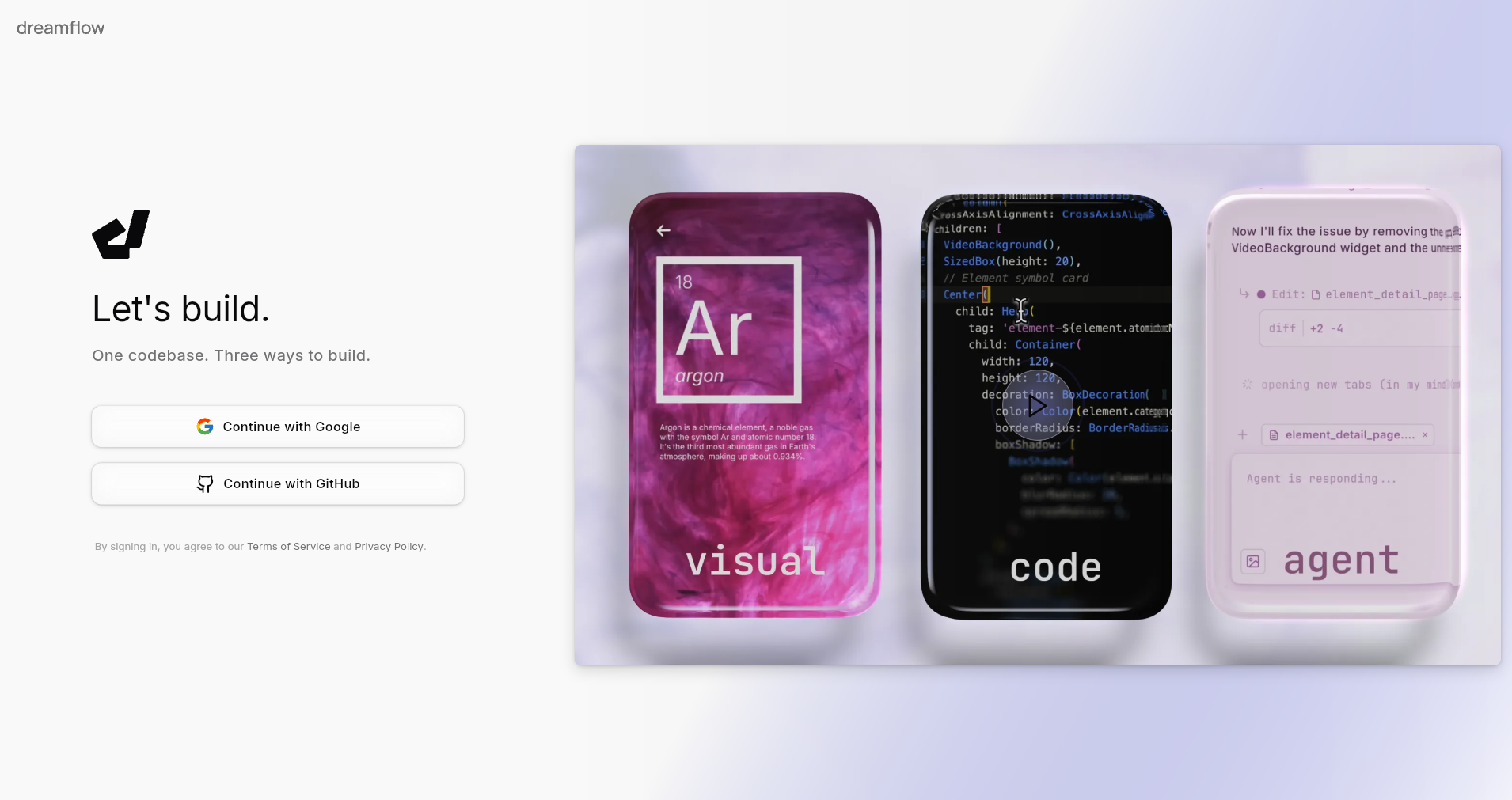
Writing your first prompt
This is where DreamFlow features start to matter. You describe what you want, and the platform generates a structure around it.
Keep it simple.
Instead of overloading details, focus on the core idea, what the app should do and what users should see. You can always refine it later.

Preview, refine, and export
After the app is generated, you can test how it works. Click through screens, check flows, and adjust things like layout or labels.
Once it feels right, export it or share it. That’s it, your first working build.
The real advantage of DreamFlow isn’t just speed. It’s how quickly you can test ideas, fix them, and try again without friction.
5. Key DreamFlow Features
Once you get past the interface, the real value of DreamFlow shows up in what it can actually do.
Multi-step workflows, not just one-off tasks
You’re not limited to a single action. You can chain steps together, take input, process it, send it somewhere, then trigger the next step. This is where most DreamFlow features start to feel useful.
AI built into the flow
Instead of using AI separately, you place it inside your workflow. That could mean generating text, analyzing data, or transforming inputs mid-process. It becomes part of the system, not an extra tool.
Custom logic without coding
You can decide how the flow behaves. Conditions, paths, different outcomes, all without writing code. It’s simple, but still flexible enough for real use cases.
Reusable workflows
Once a flow works, you don’t rebuild it. You reuse it, tweak it, or expand it. Over time, this saves more effort than it seems at first.
Not every feature is groundbreaking on its own. But together, they make DreamFlow feel practical for everyday automation.
6. DreamFlow Pricing (2026)
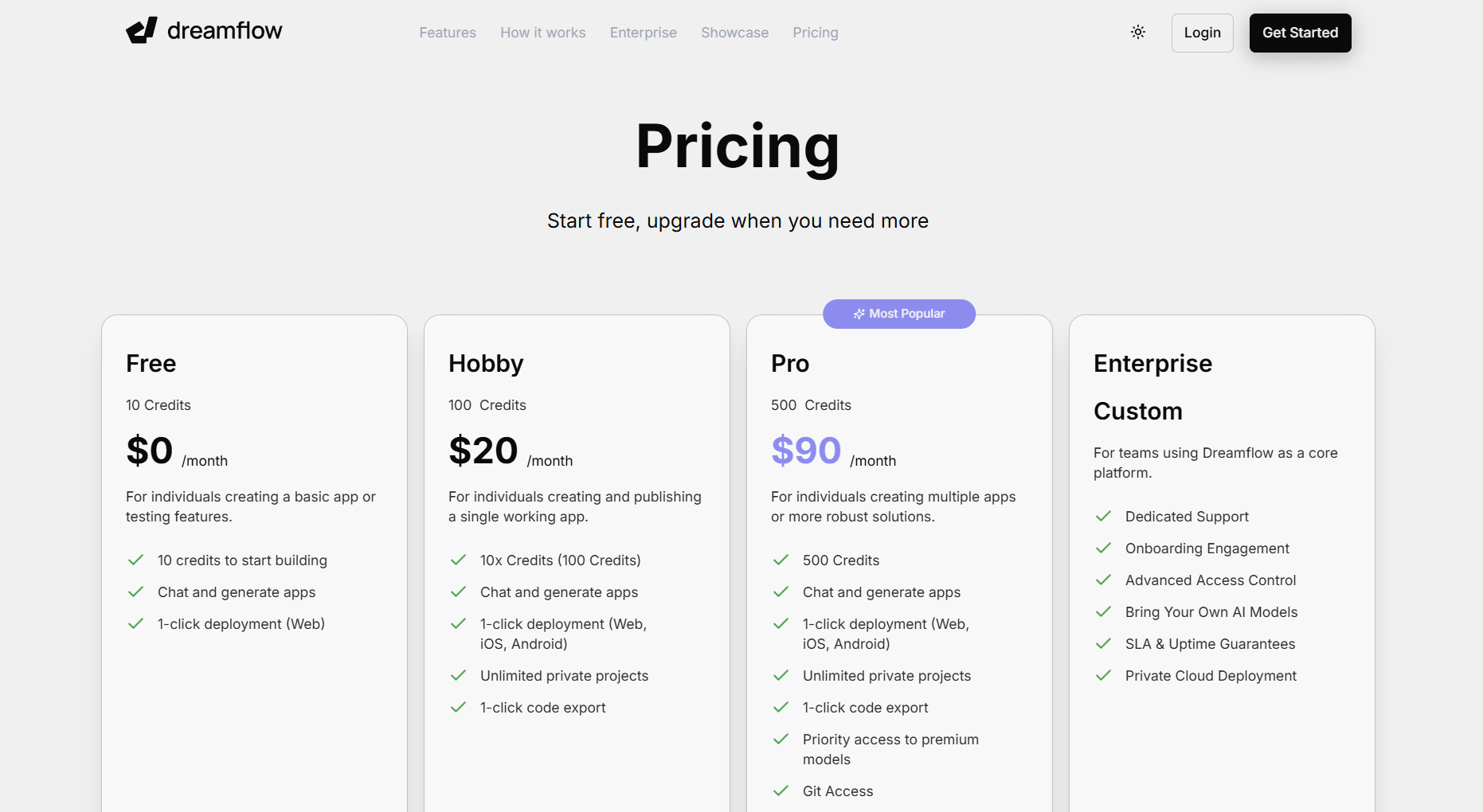
The pricing for DreamFlow is straightforward, you can start free and scale as your usage grows.
There are four main plans, each based on credits and usage.
Free plan ($0/month)
This is where most people begin. You get 10 credits, enough to test ideas and explore basic DreamFlow features. It includes app generation and simple deployment, but it’s limited.
Hobby plan ($20/month)
Designed for individuals building a single working app. You get 100 credits, along with more flexibility, including private projects and code export.
Pro plan ($90/month)
This is the most practical option for regular use. With 500 credits, you can build multiple apps, access premium models, and manage more complex workflows. It’s aimed at serious builders and small teams.
Enterprise (Custom pricing)
For teams using DreamFlow as a core platform. It includes dedicated support, advanced access control, private cloud deployment, and SLA guarantees.
The structure is simple: start small, and upgrade only when your workflows demand more.
7. Conclusion
Tools like DreamFlow are changing how apps get built. Not by replacing developers, but by removing the slow parts, setup, repetition, and constant back-and-forth.
You can start small. One idea, one workflow. Then expand it as you learn how the system behaves.
That’s the real takeaway from this DreamFlow Guide, you don’t need to build everything from scratch anymore. You design the flow once, and let it run.
And once that clicks, it’s hard to go back.
%20(1).jpg)

View more blogs
.png)

.png)


.png)


.png)
.png)
.jpg)
Ready to develop your own product? Get in touch today!
Get in Touch