



1. Introduction
Founders who build fast on Replit hit the same wall: the app works in a browser tab, but a browser tab is not a mobile product. If you are trying to figure out how to turn Replit into mobile app territory, the honest answer is that it takes more than exporting code and wrapping a webview. It takes a real Replit web app to mobile strategy, built around reusing your Replit backend and meeting native demands a web wrapper cannot. ArixLabs (previously FlutterFlowDevs) works with founders on exactly this problem every week, taking Replit-built products through a full Replit native mobile conversion and shipping them as store-ready apps on both platforms. This guide walks through what changes when you convert Replit website to app form, covering both Replit app native iOS development and Replit app Android development, where the effort goes, and why the backend you already built matters more than most founders expect.
2. Can a Replit app become a native mobile app?
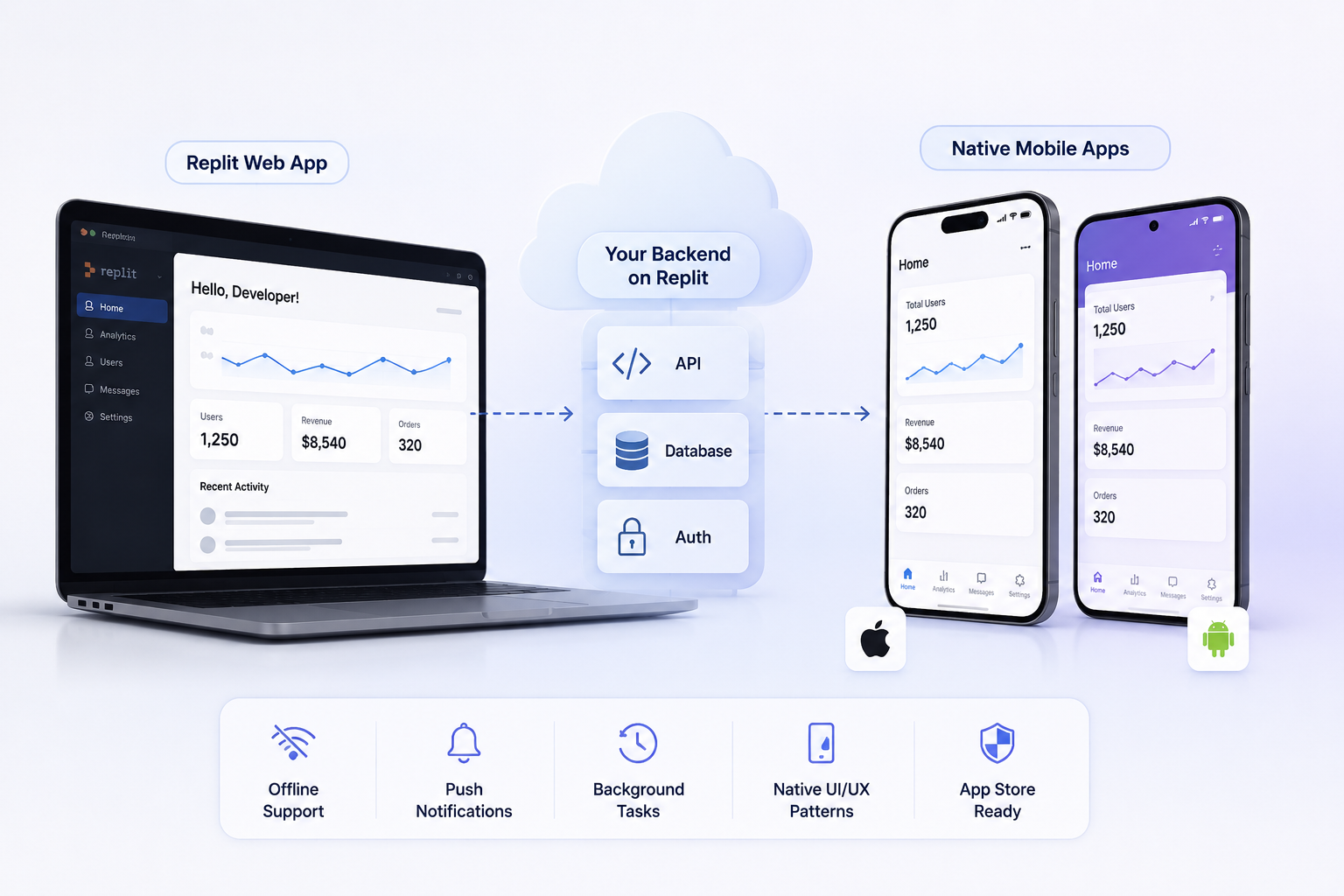
Yes, a Replit app can become a native mobile app, but rushing it is a mistake. Replit is excellent for spinning up a working backend, a functional UI, and a live demo fast. None of that speed automatically survives the jump when you try to turn Replit into mobile app form, because native apps run under a different set of rules than a hosted web page: offline behavior, push permissions, background tasks, app store review, and device-specific UI patterns all matter. The Replit web app to mobile transition works best when the underlying logic, especially the API layer and data models, is solid enough to be reused rather than rebuilt from scratch. If your Replit project already handles authentication, storage, and business logic cleanly, you are in a strong position to convert Replit website to app without starting from zero. If it is duct-taped together behind the scenes, the Replit native mobile conversion is also where those cracks show up first.
3. How do you take a Replit project to iOS and Android?
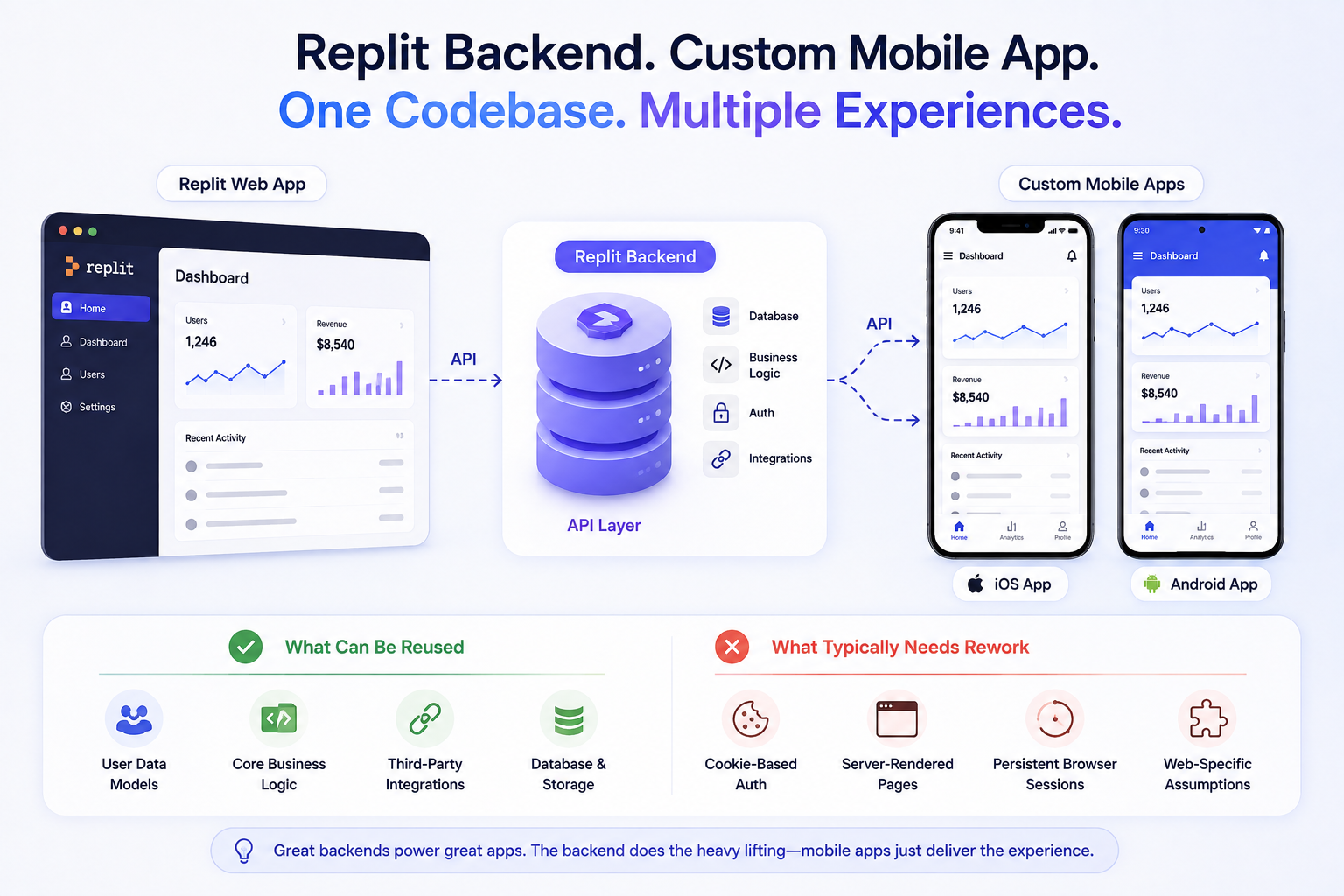
You take a Replit project to iOS and Android by separating what stays from what gets rebuilt. The backend, database schema, and API endpoints your Replit app already runs on typically stay in place, since rewriting a proven backend rarely makes sense. What changes is the front end: instead of a responsive website rendered in a mobile browser, you build a native or cross-platform app, commonly in Flutter, that talks to those same existing APIs. This is the core of any real Replit native mobile conversion project, and it is the part most founders underestimate. The interface has to be redesigned around touch targets, gestures, and platform conventions rather than mouse-and-keyboard web patterns. ArixLabs typically starts this kind of engagement by auditing the existing Replit backend, confirming what can be reused as-is, then scoping the native build separately so Replit app Android development and Replit app native iOS development run in parallel, the essence of any real turn Replit into mobile app initiative.
Every serious plan to convert Replit website to app form and every genuine Replit native mobile conversion starts from this same reuse-first principle before a single mobile screen is designed.
4. What is the process for moving Replit to mobile?
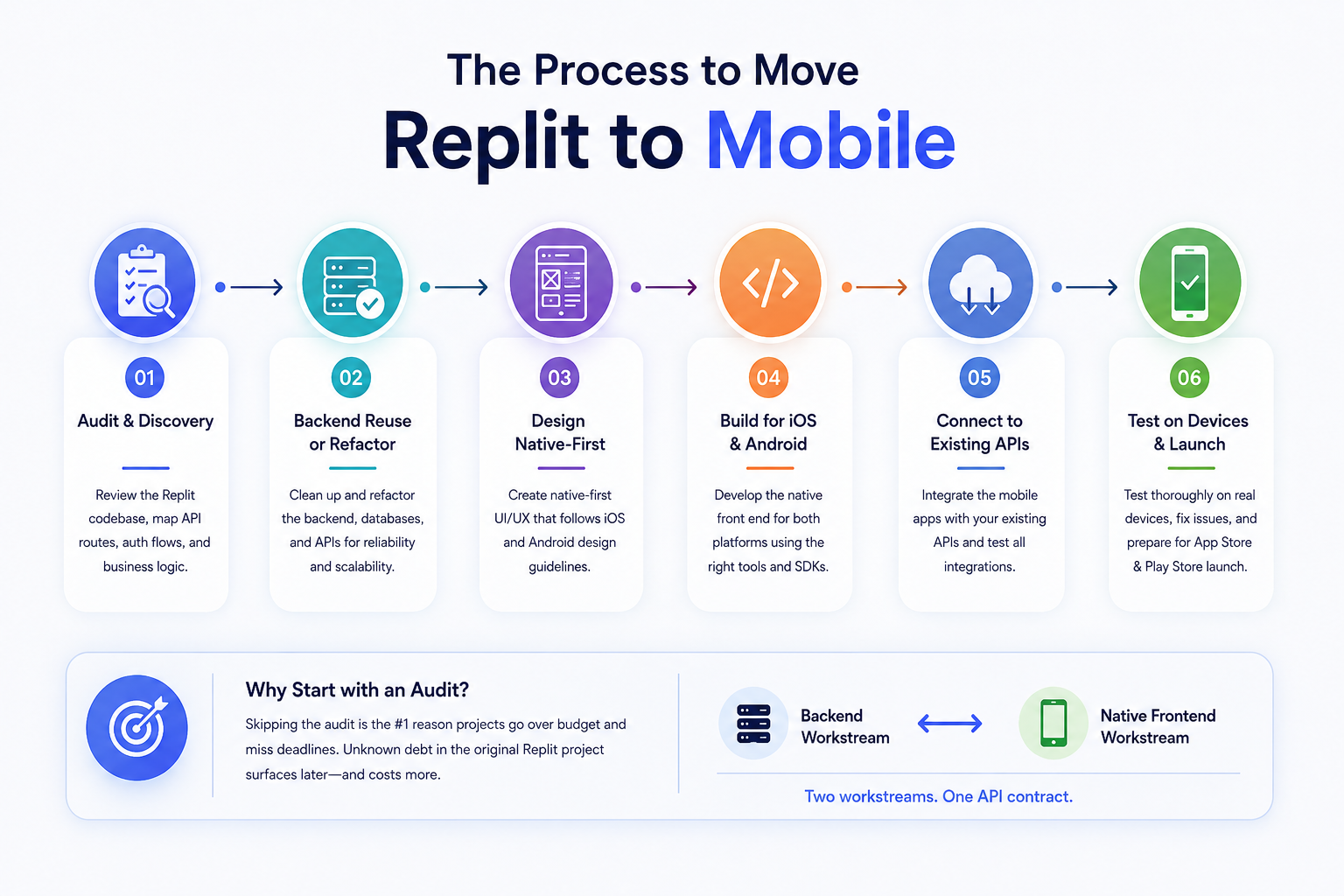
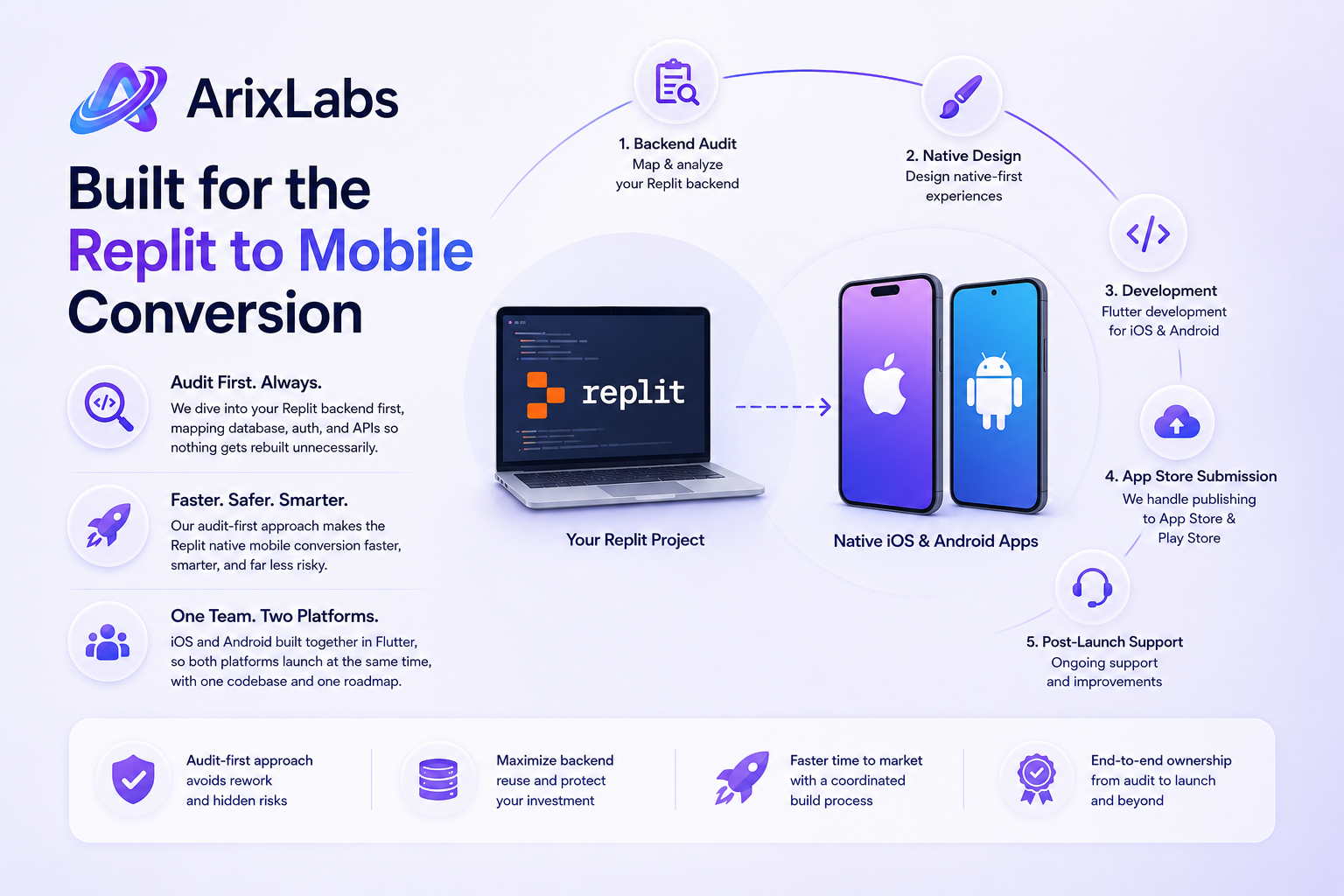
The process to convert Replit website to app form starts with an honest audit, not an immediate rebuild. A development team reviews the existing codebase to map every API route, auth flow, and piece of business logic that must survive the move. From there, the actual Replit web app to mobile process follows a consistent sequence: reuse or refactor the backend, design native-first screens, build the front end for both iOS and Android, wire it to the existing APIs, and test on real devices before anything reaches the app stores. Skipping the audit step is the single most common reason a turn Replit into mobile app project runs over budget and past deadline, because unknown technical debt buried in the original project surfaces halfway through native development instead of before a single line of code gets written. A clean process to convert Replit website to app treats the backend and the native front end as two distinct workstreams that meet at a documented API contract.
This audit-then-build sequence is what separates a rushed Replit web app to mobile attempt from a plan founders can actually budget and schedule around when they decide to turn Replit into mobile app form for real users.
5. What changes when taking Replit to native?
Almost everything about the interface changes during a Replit native mobile conversion, even when the backend barely changes at all. Web layouts built for a browser window do not translate directly onto a phone screen; navigation shifts from links and dropdown menus to tab bars, bottom sheets, and swipe gestures. Performance expectations rise sharply too, since users expect a native app to launch instantly and feel responsive even on a weak connection, a higher bar than a slow-loading web page. Session handling and authentication also need attention: web-style login flows built for Replit's hosted environment often need adjustment for native session storage, biometric login, and app store rules around account deletion. This is exactly where Replit app native iOS development and Replit app Android development genuinely diverge from an ordinary Replit web app to mobile wrapper, even when both share one Flutter codebase. A serious Replit native mobile conversion treats these platform differences as core scope from the start, not an afterthought bolted onto a rushed web build at the end.
Simply put, this touches six things at once: a Replit web app to mobile rebuild of the front end, proper Replit app native iOS development so the app behaves like an iPhone user expects, matching Replit app Android development so Play Store users get the same quality, a documented way to convert Replit website to app without losing existing data, an end-to-end Replit native mobile conversion rather than a thin wrapper around a website, and, for founders who ask "can we really turn Replit into mobile app form without starting over," a clear yes once the backend is audited properly.
These platform-level differences are exactly why treating Replit app native iOS development and Replit app Android development as a single shared checklist, rather than two separate afterthoughts, keeps a native build on schedule.
6. Can Replit functionality support a custom mobile app?
Replit functionality can support a custom mobile app, provided the backend is treated as an API layer, not a monolith tied to one front end. If your Replit project was built with clear, callable endpoints from the start, that same logic, database, and set of business rules can serve a Replit app native iOS development build and a Replit app Android development build just as well as they currently serve a web page. The features that usually carry over cleanly include user data models, core business logic, and third-party integrations already in the backend. What typically needs rework is anything assuming a persistent browser session, such as cookie-based auth or server-rendered pages, since a native app calling the backend as a pure API behaves differently. This is an encouraging reality of any Replit web app to mobile project: founders often assume they need to turn Replit into mobile app form by rebuilding everything, when the hardest engineering work, the backend, can often be preserved. A team scoping Replit app native iOS development and Replit app Android development together will usually confirm this reuse potential in the first week.
Recognizing which parts of a Replit backend qualify for reuse is itself a skill, and it is usually the first thing an experienced team checks before agreeing to convert Replit website to app on any fixed timeline as part of a proper Replit native mobile conversion.
7. How can a Replit app become production-ready mobile?
A Replit web app to mobile launch becomes production-ready through native rebuild, performance hardening, and platform compliance work that a fast prototype never needed. Production readiness means the app handles poor network conditions gracefully, recovers from crashes without losing user data, meets Apple and Google's review guidelines, and performs consistently across real devices, not just the one used during development. This is usually the point where founders bring in a team experienced in both Replit app native iOS development and Replit app Android development together, since App Store and Play Store review each carry quirks around permissions, privacy disclosures, and metadata. ArixLabs approaches every convert Replit website to app engagement with this production bar in mind from day one, addressing security, error handling, offline states, and store compliance, so the finished turn Replit into mobile app result is ready for paying users, not a demo that happens to run on a phone.
Getting to this point is the real finish line of any convert Replit website to app effort, a different milestone from getting a turn Replit into mobile app build to launch once on a personal device.
One more way to frame it, since phrasing varies: some search "Replit web app to mobile," others want "Replit app native iOS development" or "Replit app Android development" specifically, and plenty just want to know how to convert Replit website to app without jargon. Whatever the phrasing, the ask is the same: a real Replit native mobile conversion, done by people who have done it before, so the founder does not turn Replit into mobile app form through trial and error on their own dime.
8. Why ArixLabs is built for this exact conversion
Most agencies offering to turn Replit into mobile app form treat it like any mobile build, ignoring that a Replit backend has its own database patterns and auth setup a generic team will not audit efficiently. ArixLabs approaches every Replit web app to mobile engagement by starting inside the existing project, mapping the backend before a single screen gets designed, so nothing gets rebuilt unnecessarily. That audit-first habit is what makes ArixLabs' Replit native mobile conversion process faster and less risky than starting native from a blank page. On the front-end side, ArixLabs runs Replit app native iOS development and Replit app Android development as one coordinated build, typically in Flutter, so both platforms launch together instead of one trailing behind. ArixLabs provides the full service end to end: backend audit, native design, development, app store submission, and post-launch support, which is why founders looking to convert Replit website to app the right way tend to choose ArixLabs over a generalist shop.
Before the FAQ, the same six ideas one more time, since founders forwarding this to a co-founder or investor usually want the summary on hand:
- A Replit web app to mobile project reuses backend logic wherever the code already supports it
- Replit app native iOS development covers App Store review, permissions, and native gestures
- Replit app Android development covers Play Store review, device fragmentation, and native gestures
- Teams that convert Replit website to app the right way document the API contract first
- A true Replit native mobile conversion ships two native apps from one backend
- Founders can safely turn Replit into mobile app form once the backend audit is complete
In short: a Replit web app to mobile plan reuses the backend, Replit app native iOS development and Replit app Android development ship together, the right way to convert Replit website to app starts with an audit, a real Replit native mobile conversion is never a wrapper, and founders can safely turn Replit into mobile app form once that groundwork is done.
9. FAQs
1. Can Replit create iPhone apps?
Replit itself is built for web and backend development, not native iPhone app compilation, so it cannot produce an App Store-ready iOS build on its own. A Replit web app to mobile project solves this by building a genuine native front end through proper Replit app native iOS development that connects cleanly to the existing Replit backend.
2. Can Replit projects run on Android?
As part of any Replit web app to mobile plan, a Replit project's backend can power a full Android app once a native front end is built to consume its existing APIs. This is standard scope in any serious Replit app Android development engagement and does not require rewriting the underlying business logic.
3. Can a Replit app reach both app stores?
Yes, with a proper Replit native mobile conversion, a single backend can support one shared codebase, commonly built in Flutter, that ships to both the App Store and Google Play, covering Replit app native iOS development and Replit app Android development from one combined engineering effort rather than two disconnected projects.
4. Why build custom native mobile from Replit?
A custom native app delivers faster performance, offline support, real push notifications, and app store visibility that a browser-based Replit app cannot match. Founders who turn Replit into mobile app form usually do it to convert Replit website to app quality that reaches mobile-first users and unlocks proper distribution through the App Store and Play Store, which is the whole point of a genuine Replit native mobile conversion in the first place.
%20(1).jpg)

.png)
_b_change__2025__to__20.jpg)
.jpg)
.png)
.png)

.png)
Ready to develop your own product? Get in touch today!
Get in Touch