

_a_change_the__2026__to.jpg)


1. Mobile Apps Are Entering the AI-Expected Era
Not long ago, AI in apps felt like an extra. Now, it’s becoming the baseline.
Open any top app today and you’ll notice something different, it doesn’t just respond, it adapts. It suggests what you need, adjusts to your behavior, and removes small bits of effort. That’s the shift driving AI features in mobile apps right now.
Users don’t think about “AI.” They just notice when an app feels slow, repetitive, or generic. Once they experience smarter apps, expectations change fast.
And by the time we move deeper into the future of mobile apps 2027, this won’t be a differentiator anymore, it’ll be standard.
That’s where many apps fall behind. Adding random AI features doesn’t help. A chatbot or recommendation widget alone won’t fix the experience.
What actually works is using AI in focused ways, reducing effort, improving relevance, and making interactions feel smoother without being obvious.
That’s exactly what the next section covers.
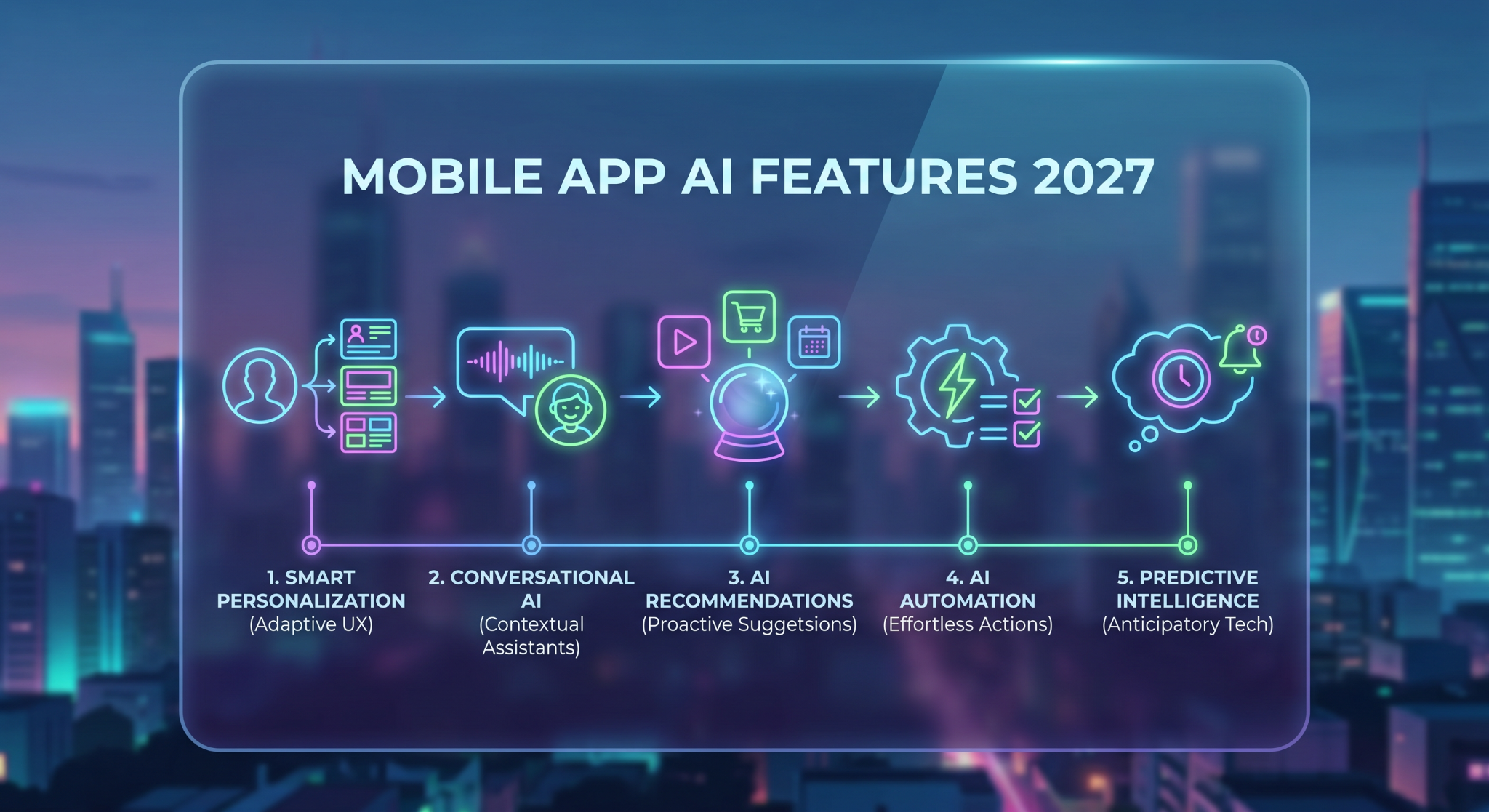
2. The 5 AI Features Every Mobile App Will Need by 2027
These aren’t experimental ideas anymore. Some apps already use them well. Most don’t. By 2027, that gap won’t exist, users will expect all five.
2.1 Smart Personalization (From Generic to Adaptive Experiences)
Most apps still treat users the same. Same homepage. Same suggestions. Same flow.
That’s exactly what AI is fixing.
Smart personalization means the app adjusts based on what users actually do, not what they selected once during onboarding. It tracks behavior, timing, preferences, and gradually reshapes the experience.
Think about:
- Content apps surfacing what you’ll likely watch next
- Shopping apps highlighting what you’re most likely to buy
- Finance apps adapting dashboards based on usage
This is where AI features in mobile apps start making a visible difference. Done right, it feels natural. Done poorly, it feels forced or repetitive.
2.2 Conversational AI (Assistants That Actually Help)
Basic chatbots are easy to spot, and easy to ignore.
What’s replacing them is conversational AI that understands context, not just keywords. Instead of pushing users through menus, it lets them ask, explore, and act directly.
Real use cases:
- Helping users find products or content
- Answering support queries instantly
- Guiding onboarding without long tutorials
This isn’t about adding a chatbot for the sake of it. It’s about reducing friction. When it works, users don’t think, they just ask.
2.3 AI-Powered Recommendations (Predicting What Users Want)
Recommendations are everywhere. But most are still reactive.
The shift now is toward prediction.
Instead of waiting for users to search, apps suggest what they’ll likely need next. Products, content, actions, it all becomes proactive.
This is one of the most impactful AI features in mobile apps because it directly affects engagement:
- More time spent inside the app
- Faster decisions
- Higher conversions
And interestingly, users rarely notice the system behind it. They just feel like the app “gets it.”
2.4 AI Automation in Apps (Reducing User Effort to Near Zero)
This is where things start to feel powerful.
AI automation in apps focuses on removing repetitive actions:
- Auto-filling forms
- Scheduling tasks
- Suggesting next steps
- Triggering actions based on behavior
Instead of asking users to do more, the app does more for them.
The result? Fewer taps, fewer decisions, and smoother flows.
Apps that still rely on manual input for everything will start to feel outdated very quickly.
2.5 Predictive Intelligence (Apps That Act Before Users Do)
This is the most subtle, and the most powerful.
Predictive intelligence goes one step further than recommendations. It anticipates what users might need and prepares for it.
Examples:
- Reminders before you forget something important
- Suggestions based on patterns (not just recent actions)
- Smart notifications that actually matter
But there’s a fine line here. Helpful vs intrusive.
The best apps get this right by staying relevant without overwhelming users.
These five aren’t separate features, they often overlap. Personalization feeds recommendations. Automation uses prediction. Conversational AI ties it all together.
That’s why they matter. Not individually, but as a system.
3. Why These 5 Features Will Define Winning Apps
These features aren’t just trends, they directly affect how users behave inside your app.
When apps adapt, suggest, and automate, users stay longer. They don’t feel like they’re navigating, they feel like things just work. That’s where AI features in mobile apps start driving real engagement.
Retention improves for the same reason. Static apps feel outdated quickly, while smarter apps evolve with user behavior.
And then there’s conversion. Features like recommendations and AI automation in apps reduce friction. Fewer decisions. Faster actions.
This applies across categories:
- E-commerce → better discovery, more sales
- Content → longer sessions
- Fintech → quicker decisions
- SaaS → less manual work
Building these features also isn’t as expensive as it used to be. You don’t need full AI teams anymore, just the right tools and integrations.
By the future of mobile apps 2027, this won’t be optional. Apps that get this right will feel effortless. Others will feel behind.
4. Building AI Features Without Heavy Development
A while back, adding AI to an app meant one thing, complexity. You needed specialists, time, and a lot of patience.
That’s changed.
Most teams today aren’t building AI. They’re using it. Plugging into existing systems, layering them into the app, and moving on. That’s why AI features in mobile apps are showing up faster than ever.
You don’t start with models. You start with a problem.
Say you want smarter recommendations. Or a better onboarding flow. Instead of building everything from scratch, you connect what’s already available and shape it around your app.
That’s where tools built around FlutterFlow AI integration come in. You’re not dealing with heavy backend logic, you’re deciding where the feature fits and how it behaves.
And honestly, that’s the bigger shift. It’s less about “can we build this?” and more about “should we build this here?”
Speed becomes the advantage. You try something, see how users respond, tweak it, and move on. No long cycles. No overengineering.
You don’t need an AI team to start. You just need a clear use case.
5. How to Build These Features Using FlutterFlow
This is where things get practical.
You don’t “add AI” in one step. You layer it in, feature by feature, based on what your app actually needs.
With FlutterFlow AI integration, the approach is usually simple:
you design the UI, connect an API, and control how the data flows.
For example:
- A chatbot → connect to an AI API and map responses to your UI
- Recommendations → send user data, receive suggestions, display dynamically
- Automation → trigger actions based on inputs or behavior
Nothing here requires building models from scratch. You’re using existing AI services and shaping them inside your app.
What matters more is where you place these features.
Adding AI everywhere doesn’t help. Adding it where users feel friction, that’s what works.
One useful way to think about it:
start with one feature. Not five.
Maybe it’s recommendations. Maybe it’s a simple assistant. Build it, test it, see how users respond. Then expand.
That’s how most successful apps approach AI features in mobile apps, not as a big launch, but as gradual improvements.
6. Conclusion
By 2027, AI will no longer be a standout feature—it will be an expected part of everyday app experiences. The most successful apps won't be those with the most advanced AI, but those that use it naturally to simplify tasks, personalize experiences, and reduce user effort.
The key isn't to build everything at once. Start with one meaningful AI feature, solve a real problem, and improve over time. As the future of mobile apps evolves, the apps that adapt thoughtfully to user needs will remain the most relevant and valuable.
%20(1).jpg)









.png)
Ready to develop your own product? Get in touch today!
Get in Touch