

%20%5Bweb-search%5D_a_change__2025__to__20.jpg)


1. Why AI Is Now a Must-Have in Apps (2026 Reality)
Open a few apps on your phone right now. Chances are, at least one of them can chat, suggest something useful, or generate content on the fly. That’s not a coincidence.
This is exactly where GenAI in FlutterFlow apps is starting to show up.
Users don’t think about “AI features” anymore—they just expect apps to feel smart. If something can’t answer a question or adapt to what they’re doing, it feels… a bit old.
The interesting part? Building these features isn’t as complicated as it used to be.
With FlutterFlow AI integration, you’re not training models or setting up heavy systems. You’re connecting your app to existing AI services through APIs. Input goes in, response comes out. Simple flow.
That’s why more teams are trying to build AI apps with FlutterFlow instead of starting from scratch.
And no—you don’t need to be a hardcore developer. If you understand how data moves from one place to another, you’re already halfway there.
In 2026, this shift is pretty clear: apps that feel static don’t hold attention for long. The ones that respond instantly? Those are the ones people stick with.
2. What FlutterFlow AI Integration Actually Means
At its core, FlutterFlow AI integration isn’t complicated. You’re not building AI—you’re connecting your app to it.
Here’s the simple flow:
- User enters something (text, question, prompt)
- It’s sent using FlutterFlow API integration
- An AI service processes it
- The response shows inside your app
That’s it. Just input → API → output.
Most people overthink this part. You don’t need to train models or handle complex systems. You’re using existing AI tools and plugging them into your app.
This is exactly why no-code AI app development is possible today.
Once you understand how APIs work, everything becomes easier:
- You decide what data to send
- You define how the API responds
- You display the result in your UI
And that answers a key question: How does FlutterFlow API integration work for AI services?
It’s simply structured data going back and forth.

3. How AI Works Inside a FlutterFlow App
Let’s walk through what actually happens when someone uses AI in your app.
A user types something—maybe a question or a prompt. That input doesn’t stay inside the app. It’s sent out through an API call.
This is where FlutterFlow API integration comes in again.
The flow looks like this:
- User input → sent to API
- AI service processes it
- Response comes back
- App displays the result
It happens in seconds, but that’s the full cycle.
What makes this interesting is how little you need to manage. You’re not dealing with models or training data. You’re just moving data between your app and the AI service.
That’s why even beginners can get started.
You define:
- Where the input comes from (text field, button, etc.)
- What gets sent to the API
- Where the response should appear
And suddenly your app feels interactive.
This is also where AI chatbot integration becomes possible. The same flow repeats—user sends a message, AI responds, and the conversation continues.
So when people ask, Do you need coding knowledge to add AI to FlutterFlow apps?
Not really. You need clarity on the flow more than coding itself.
4. Real AI Features You Can Build Today
Once you understand the flow, things open up quickly. You’re not limited to one use case—there are plenty of practical features you can build right away.
Let’s look at a few.
AI chatbot (most common starting point)
This is where most people begin with AI chatbot integration. A simple chat interface where users ask questions and get instant replies. It works for support, assistants, or even internal tools.
Text generation
Need content inside your app? You can generate captions, summaries, or even long-form text. This is one of the easiest ways to use GenAI in FlutterFlow apps.
Image generation
Users type a prompt, and the app returns an image. Great for creative tools or social apps.
Smart suggestions
Apps can recommend products, ideas, or next steps based on user input. This makes the experience feel more personalized without complex logic.
The key point here—none of this requires building AI from scratch. You just build AI apps with FlutterFlow by connecting the right APIs and shaping the output in your UI.
And yes, this answers a common question: Can you build an AI chatbot using FlutterFlow?
Absolutely. It’s one of the most straightforward implementations.

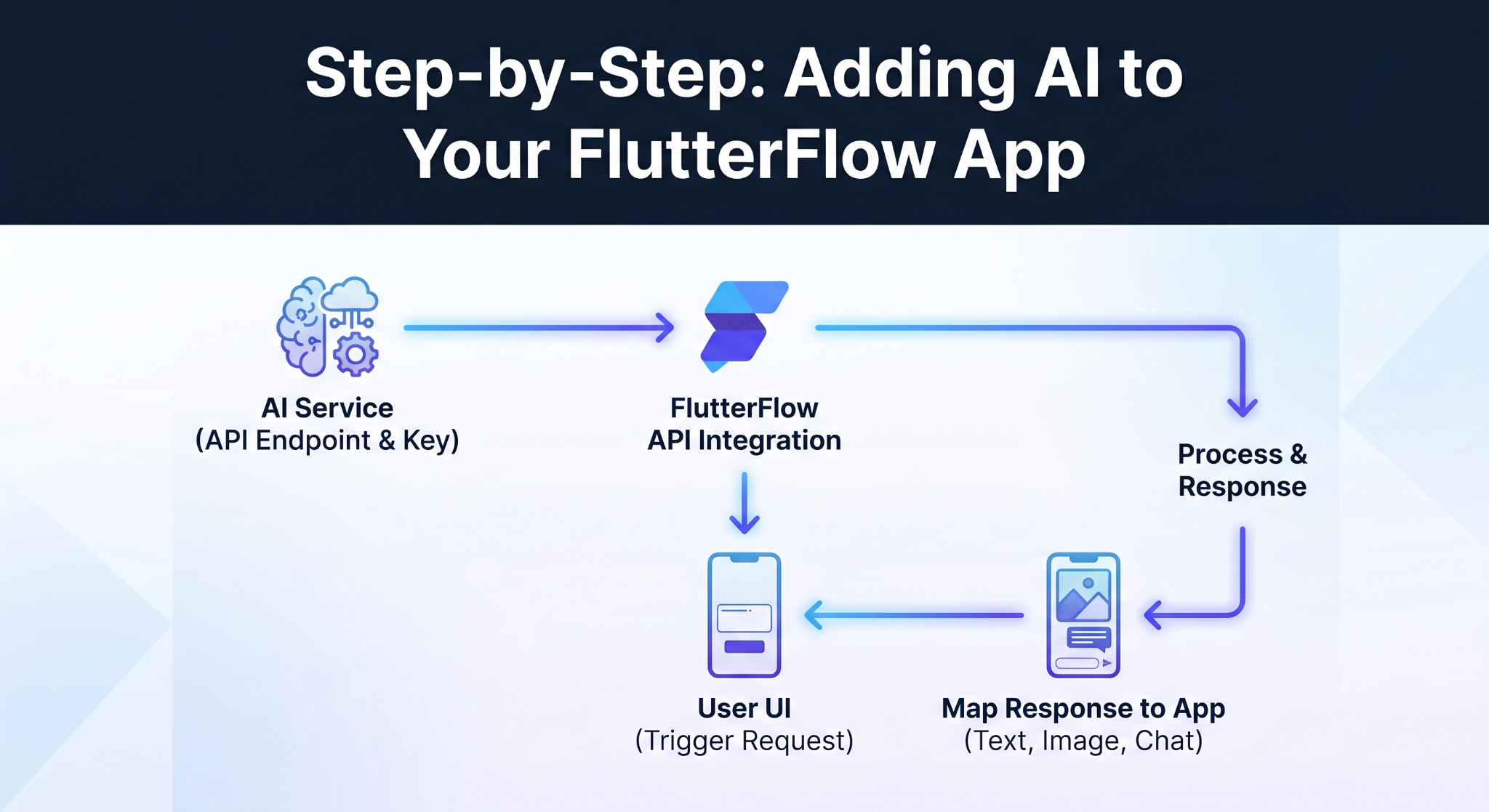
5. Step-by-Step: Adding AI to Your FlutterFlow App
This part sounds harder than it actually is.
You’re basically wiring things together.
Start with the API. Whatever AI service you’re using will give you an endpoint and a key. That’s your connection point. Nothing fancy here.
Then inside FlutterFlow, you set up the call using FlutterFlow API integration. You decide what gets sent—usually a prompt or some user input—and where it should go.
Now connect it to your UI.
A text field, a button… anything that triggers the request. The moment a user interacts, that data gets sent out, processed, and returned.
And here’s where people usually pause—what about the response?
You just map it back into your app. Show it as text, an image, or even inside a chat-style layout if you’re doing AI chatbot integration.
That’s the loop.
You’ll probably tweak things a few times. Prompts especially. One small change can completely change the output. That’s normal.
This is why people lean toward no-code AI app development. You’re not building intelligence—you’re connecting it.
And once it clicks, it really clicks.
6. Best AI Services to Use with FlutterFlow in 2026
There’s no single “best” AI service—it depends on what you’re building.
Most apps start with text-based features. Chat, summaries, simple content generation. That’s where GenAI in FlutterFlow apps usually begins, and tools like OpenAI are a common choice because they’re easy to plug in.
But if your app is more visual, image generation APIs make more sense. Same idea—user input goes in, output comes back—just in a different format.
Some platforms offer everything in one place, but you don’t need that right away.
A simpler approach works better: pick one use case, get it working, then expand.
That’s how most teams build AI apps with FlutterFlow—one solid feature at a time.
7. Common Mistakes to Avoid When Integrating AI
Most issues don’t come from the AI itself—they come from how it’s used.
One common mistake is rushing the setup. With FlutterFlow API integration, even small errors in headers or request format can break everything. It’s usually something simple, but easy to miss.
Then there’s the prompt problem.
If your input is vague, the output will be too. People often expect perfect results without adjusting how they ask. That rarely works.
Another one—ignoring delays. AI responses aren’t always instant. If your app doesn’t handle loading states properly, it feels broken even when it’s working fine.
And finally, not thinking ahead. A feature might work in testing but struggle with real users if you don’t consider limits or scaling.
None of these are complicated issues. But they show up often when people first try FlutterFlow AI integration.
Fixing them early saves a lot of time later.
8. Conclusion
AI isn’t some “extra feature” anymore. It’s becoming part of how apps are expected to behave.
The good part? You don’t need a complex setup to get started. With FlutterFlow AI integration, you’re simply connecting your app to existing AI services and shaping how the responses show up.
That’s why more teams are starting to build AI apps with FlutterFlow instead of going the traditional route.
Start small. One feature. One use case. Then expand from there.
That’s usually enough to get something powerful working.
%20(1).jpg)

View more blogs
.png)

.png)

.png)
.png)

Ready to develop your own product? Get in touch today!
Get in Touch